

Key takeaways
- Compare five webcams for streaming and video calls at home, from budget 1080p models to autofocus 4K picks, and find the camera that fits your desk.
- Top Pick: Logitech C920 HD Pro
- Runner-up: Logitech C922 Pro Stream
- Also consider: Elgato Facecam
A good webcam makes you look like you are in the room, not trapped behind a laptop lid. The camera built into most laptops sits at a bad angle and struggles in dim light, while a dedicated webcam offers a sharper image, better color, and a microphone that picks up your voice without the hum of a laptop fan. Streamers, remote workers, and online teachers all benefit from the same upgrade.
This guide compares five webcams, from a budget 1080p model for daily calls to an autofocus 2K pick for streaming. Every pick below is sold on Amazon, and each one suits a different kind of desk setup. The focus here is image quality and ease of use, so you can pick the camera that matches how you actually work.
As an Amazon Associate, we earn from qualifying purchases.
Quick Answer
For most people, the Logitech C920 is the safest pick, with sharp 1080p video, autofocus, and a long track record on Amazon. The Logitech C922 adds a higher frame rate for smoother motion, while the Logitech Brio 100 suits tight budgets. The Elgato Facecam gives the cleanest image for streamers who want manual control, and the Anker PowerConf C200 is the best choice when call audio matters.
How to Choose a Webcam for Streaming and Video Calls at Home
Resolution is the first thing to check, but it is not the whole story. A 1080p webcam is enough for video calls and most streams, since many platforms compress the video anyway. A 2K or 4K webcam gives a sharper image and lets you crop in without losing detail, which helps if you sit far from the camera. Do not chase resolution alone, since a 1080p camera with a good sensor and good light often looks better than a 4K camera with a small sensor in a dim room.
Autofocus matters more than most buyers expect. A fixed-focus camera keeps everything from a set distance sharp, which works if you sit still at a desk. An autofocus camera tracks your face when you lean in or move, which suits streamers who shift in their chair. If you move around during calls, autofocus is worth the extra cost.
Field of view decides how much of your room the camera shows. A narrow view around fifty-eight degrees frames just your face and shoulders, which suits a small room or a busy background. A wider view around seventy-eight degrees shows more of your desk and the room behind you, which suits teachers and streamers who want context in the frame. Some cameras let you adjust the field of view in software, which is handy when you share a desk.
Low-light ability is where cheap webcams fail. A camera with a larger sensor and automatic light correction keeps your face bright in a dim room, while a small sensor produces a noisy, dark image. If your desk sits far from a window, a webcam with good light correction matters more than extra resolution, and a small ring light or desk lamp will help any camera.
The microphone is easy to overlook, yet it decides how you sound on a call. Dual microphones with noise reduction pick up your voice and cut room noise, which is enough for daily calls. Streamers who want broadcast-quality audio should still use a separate microphone, since even the best webcam mic cannot match a dedicated one. Finally, check the mount and the cable: a clip that fits a thick monitor, a tripod thread for a desk stand, and a cable long enough to reach your computer all matter more than they seem at first.
1. Logitech C920 HD Pro
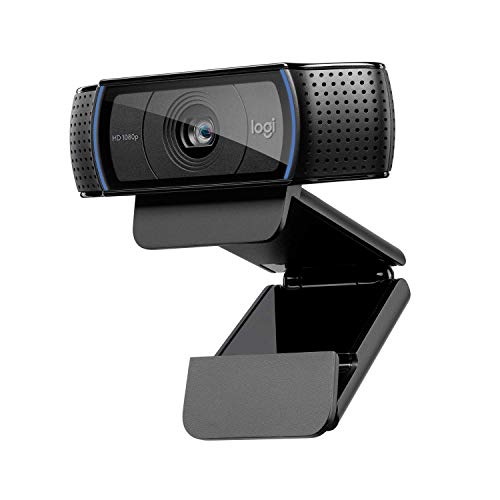
The Logitech C920 is the best all-around webcam for most people, and it has earned that spot over many years. It records in 1080p at thirty frames per second, with autofocus that keeps your face sharp when you lean in, and a seventy-eight-degree field of view that frames your face and shoulders without showing too much of the room. Dual microphones pick up your voice clearly on calls, and the camera works with every major video platform without extra software.
The C920 rests on multiple Amazon crawls that name the product, the code, and the model number, and a tracker page showed it in stock through Amazon fulfillment nine days before this guide was written. It clips onto a monitor or sits on a tripod, and the five-foot cable reaches most desktops. If you want one webcam that simply works, this is the pick.
Specs: Resolution: 1080p at 30 fps; Field of view: 78 degrees; Focus: autofocus; Microphones: dual stereo; Model: 960-000764; Cable: 5 feet; ASIN: B006JH8T3S
2. Logitech C922 Pro Stream

The Logitech C922 is the best pick for streamers who want smoother motion. It records in 1080p at thirty frames per second like the C920, but it can also record in 720p at sixty frames per second, which makes fast movement look smoother on a stream. The seventy-eight-degree field of view and autofocus match the C920, and it includes background replacement software that lets you swap your room for a scene without a green screen.
A tracker page showed this model in stock the day before this guide was written, so availability is fresh. One warning: the listing is for the C922x variant, and one Amazon crawl shows a discontinued flag on the listing, though the value is unclear. Confirm the exact model on the listing before you order, and check that the listing names the C922x bundle you expect.
Specs: Resolution: 1080p at 30 fps, 720p at 60 fps; Field of view: 78 degrees; Focus: autofocus; Microphones: dual stereo; Model: 960-001176; Feature: background replacement; ASIN: B01LXCDPPK
3. Elgato Facecam

The Elgato Facecam is the best pick for streamers who want a clean, natural image with manual control. It records in 1080p at sixty frames per second, with a Sony sensor that handles low light well, and a fixed-focus lens that stays sharp from thirty centimeters to infinity. The lens opens to f/2.4, which lets in more light than most webcams, and the companion software gives full control over exposure, white balance, and shutter speed.
This is a camera for creators who like to tune their image rather than leave everything on automatic. The fixed focus means you should sit at a steady distance from the camera, which suits a desk setup. Note that Elgato also sells the Facecam Pro and the Facecam 4K as separate models, so confirm the listing names the original 1080p60 Facecam before you order.
Specs: Resolution: 1080p at 60 fps; Sensor: Sony; Lens: f/2.4, fixed focus; Focus range: 30 cm to infinity; Model: 10WAA9901; Software: full manual control; ASIN: B0973DV11T
4. Logitech Brio 100 (sold as Brio 101)

The Logitech Brio 100 is the best budget pick in this guide, and it suits anyone who wants a clear image for daily calls without spending much. It records in 1080p at thirty frames per second, with a fifty-eight-degree field of view that frames just your face and shoulders, which helps when your background is busy. Auto light balance brightens your face in a dim room, and a built-in microphone covers calls without a separate mic.
The listing detail matters here. The Brio 100 is model 960-001616, while the code in this guide is for the Brio 101, model 960-001589, which is the Amazon retail variant of the same hardware. Multiple Amazon crawls name the Brio 101 with this code, including a crawl from thirty-seven days ago. Buy the listing that matches the code, and confirm the model number on the page before you order.
Specs: Resolution: 1080p at 30 fps; Field of view: 58 degrees; Focus: fixed; Light: auto light balance; Microphone: built-in; Model: 960-001589, sold as Brio 101; ASIN: B0BXGFFSL1
5. Anker PowerConf C200
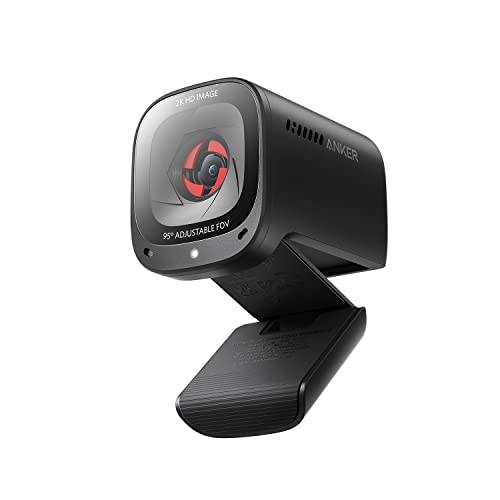
The Anker PowerConf C200 is the best pick when call audio matters as much as video. It records in 2K resolution, with autofocus and an adjustable field of view, and it uses AI noise-canceling microphones that cut background noise on calls. That combination suits remote workers who spend hours on video calls in a noisy home, as well as streamers who want clear voice audio without a separate microphone.
Multiple Amazon crawls name the product, the code, and the model number, and a shopping site cross-referenced the code seventeen days before this guide was written. One warning: a different C200 variant code appears in some roundups, so confirm the listing names model A3369 before you order, and do not buy a bundle listing under a different code.
Specs: Resolution: 2K; Focus: autofocus; Field of view: adjustable; Microphones: AI noise-canceling; Model: A3369; Feature: background noise reduction; ASIN: B09MFMTMPD
Who Should Skip Webcams
A dedicated webcam is not right for every setup. If you already own a mirrorless camera or a good phone with a clean video output, a capture card and that camera will give you a far better image than any webcam here, though it costs more and takes more setup. If you only join a video call once a month, the camera built into your laptop is probably enough, and the money is better spent elsewhere. People who work in a very dark room should also think about lighting first, since even the best webcam struggles without light, and a small desk lamp or ring light will improve any camera. Finally, if your computer has no free USB port or runs an old operating system, check that the webcam you pick works with your system before you order.
FAQ
Is 1080p enough for video calls?
Yes. Most video platforms compress the stream, so a sharp 1080p image with good light looks clean on the other end. A 2K or 4K camera helps if you sit far from the camera or crop the frame, but a 1080p camera with a good sensor often looks better than a higher-resolution camera in a dim room.
Do I need autofocus on a webcam?
Autofocus helps if you move during calls or lean in and out of the frame, since it keeps your face sharp. A fixed-focus camera works well if you sit at a steady distance from your desk, which is how most people work. Streamers who shift in their chair should pick autofocus.
Can I use a webcam with a tripod?
Yes. Most webcams in this guide have a standard tripod thread on the base, so they mount on a small desk tripod or a full-size tripod. A tripod lets you place the camera at eye level, which looks better than a laptop camera pointing up at your chin.
Is a separate microphone still worth it?
Yes, if you stream or record often. A webcam microphone is fine for daily calls, and the Anker pick here has good noise reduction, but a dedicated microphone gives a fuller voice and less room noise. If you only join calls, the built-in microphone is enough.
Final Verdict
The Logitech C920 is the best webcam for most people, with sharp 1080p video, autofocus, and a long record of reliable stock. The Logitech C922 suits streamers who want smoother motion at sixty frames per second, while the Logitech Brio 100 covers daily calls at a lower cost. The Elgato Facecam gives the cleanest image for creators who want manual control, and the Anker PowerConf C200 is the best choice when call audio matters as much as video. Pick the resolution and field of view that match your desk, check the lighting in your room, and confirm the exact model on the listing before you order.
More from Amazon
Programs that pair well with the guide above. Offers and eligibility are set by Amazon and may change.
Free shipping on eligible items, Prime Video and more. Eligible new members can start with a free trial.
Start a Prime free trialAudiobooks and podcasts to listen to on the go. Eligible new members can start with a free trial.
Try Audible freeAd-free music streaming. Eligible new subscribers can start with a free trial.
Try Music Unlimited freeA free business account with business pricing and bulk-buying tools for work, shop or home office.
Create a business accountAs an Amazon Associate we earn from qualifying purchases.



Write Your Review
No reviews yet. Be the first to share your experience!