

Key takeaways
- Compare five stream decks for Twitch, YouTube and podcast setups, from a compact eight-key pad to a 32-key control surface with dials and touch controls.
- Top Pick: Elgato Stream Deck MK.2
- Runner-up: Elgato Stream Deck XL
- Also consider: Elgato Stream Deck Plus
A stream deck puts the controls of a live show on physical keys. One tap switches a scene in OBS, mutes a microphone, fires a sound clip, changes a light, or posts a message to chat, all without dragging a mouse across three monitors while the audience watches.
The five decks below cover the full range of this category: a compact eight-key pad for a tight desk, the fifteen-key classic most streamers end up with, a thirty-two-key surface for multi-camera productions, a dial-and-touch-strip console for audio work, and a touchscreen rival from Loupedeck. Every pick runs on Windows and macOS.
As an Amazon Associate, we earn from qualifying purchases.
Quick Answer
Most streamers should buy the Elgato Stream Deck MK.2, with fifteen LCD keys and the largest plugin library in the category. Creators who mix audio live should look at the Stream Deck Plus, with four dials and a touch strip, while multi-camera productions belong on the thirty-two-key Stream Deck XL. The Neo suits a small desk, and the Loupedeck Live S suits editors.
How to Choose a Stream Deck
Key count is the first decision, and it is the one people get wrong most often. Count the actions you use in one session: scenes, mute, cameras, sound effects, chat, lights, and recording. If that count is under eight, a compact deck works. Between eight and fifteen, the classic fifteen-key layout fits. Above fifteen, folders and pages can hide actions, but a thirty-two-key surface keeps them visible.
Control type is the second decision. Plain LCD keys are enough for scene and source switching. Rotary dials earn their place when you adjust volume, brightness, or zoom during a show, because a dial changes a value smoothly while a key can only nudge it. A touch strip adds a slider for the same job. Touchscreen buttons trade the click of a key for a flat surface.
Software support is the third decision. Elgato decks run through the Stream Deck app, which has the largest plugin library in this category, with integrations for OBS Studio, Streamlabs, Twitch, YouTube, Discord, Spotify, Philips Hue, and Adobe apps. Loupedeck runs its own software with strong support for Photoshop, Premiere Pro, and Final Cut Pro. Check that the apps you use every day have a plugin for the deck you are considering. A thirty-two-key deck is roughly twice as wide as a fifteen-key one. All five decks need a computer alongside them; none works alone, and none supports Linux. Finally, confirm the exact model on the listing: classic MK.2 10GBA9901, scissor-key MK.2 20GBL9901, black Plus 20GBD9901, white Neo 20GBJ9901.
1. Elgato Stream Deck MK.2

The MK.2 is the deck most streamers should buy. Fifteen LCD keys sit in a five-by-three grid, each key showing a custom icon or live data such as a follower count or a timer. The keys are the classic membrane type Elgato has used since the first Stream Deck, with a soft press and a clear click at the bottom of travel.
The software is the real reason this deck leads the category. The Stream Deck app supports hundreds of plugins, and the integrations for OBS Studio, Streamlabs, Twitch, YouTube, Discord, and Spotify are first-party and well maintained. Folders let fifteen keys hold many more actions, and multi-action macros chain keystrokes, delays, and app commands into a single press. Fifteen keys suits a solo streamer with a handful of scenes.
Specs:
– Keys: 15 customizable LCD keys, 72 by 72 pixel icons
– Key type: Classic membrane keys
– Dials: None
– Touch strip: None
– Connectivity: USB-C, detachable cable
– Size: 118 by 84 by 30 mm without stand
– Weight: 145 g without stand, 270 g with stand
– Model: 10GBA9901
– ASIN: B09738CV2G
2. Elgato Stream Deck XL

The XL takes the MK.2 formula and doubles the key count. Thirty-two LCD keys in an eight-by-four grid cover an entire production without folder diving: every scene, every camera, every sound effect, and every lighting preset can sit on the surface at once. For a multi-camera show or a podcast with several guests, that always-visible layout is the point of the purchase.
Everything else follows the MK.2 playbook: the same Stream Deck app, the same plugin library, the same detachable USB-C cable, and the same magnetic stand. What changes is scale: the deck measures 182 by 112 by 34 mm and weighs 410 grams, so it needs a wider stretch of desk than the MK.2. Confirm the listing names model 10GAT9901 before ordering, since an older code for this deck no longer matches the current listing.
Specs:
– Keys: 32 customizable LCD keys, 72 by 72 pixel icons
– Key type: Classic membrane keys
– Dials: None
– Touch strip: None
– Connectivity: USB-C, detachable cable
– Size: 182 by 112 by 34 mm without stand
– Weight: 410 g without stand
– Model: 10GAT9901
– ASIN: B0CC9R1P17
3. Elgato Stream Deck Plus

The Stream Deck Plus is the deck for creators who adjust things during a show rather than just switching them. Eight LCD keys sit above a touch strip, and four rotary dials with a push function sit below. The dials turn volume, brightness, zoom, and mic gain into smooth physical adjustments, and the touch strip works as a slider for the same values.
Eight keys is a small grid, and that is the honest trade-off here. Folders and pages carry the extra actions, and the dials and touch strip take over the work that would otherwise need more keys. For a podcaster who rides mic levels or an editor who scrubs timelines, that trade is worth making. The Plus also accepts the XLR Dock accessory, sold separately. Check the listing: the black Plus is model 20GBD9901, and a white version is a different listing.
Specs:
– Keys: 8 customizable LCD keys, 72 by 72 pixel icons
– Key type: Classic membrane keys
– Dials: 4 rotary dials with push function
– Touch strip: LCD touch strip
– Connectivity: USB-C, detachable cable
– XLR Dock: Compatible, sold separately
– Model: 20GBD9901
– ASIN: B0BJL8SJ59
4. Elgato Stream Deck Neo

The Neo is the compact deck for a small desk or a laptop setup. Eight LCD keys share the front with an Infobar, a small display that shows the time, the date, and notifications at a glance, and two touch points on the sides switch between pages. A three-position stand tilts the deck to a low, medium, or high angle, and the whole unit measures 107 by 78 by 26 mm and weighs about 210 grams.
The Neo runs the same Stream Deck app as its larger siblings, so plugins for OBS Studio, Twitch, Zoom, Teams, Spotify, and Office apps all work the same way. Eight keys with pages is enough for scene switching, mute, and a few sound effects, or for one-touch meeting controls. The pick here is the white Neo, model 20GBJ9901; a black version is a different listing, so confirm the white model before ordering.
Specs:
– Keys: 8 customizable LCD keys
– Key type: Customizable LCD keys with Infobar display
– Touch points: 2 page-switching touch points
– Dials: None
– Touch strip: None
– Connectivity: USB-C
– Size: 107 by 78 by 26 mm
– Weight: About 210 g
– Model: 20GBJ9901, white
– ASIN: B0CVY4566H
5. Loupedeck Live S
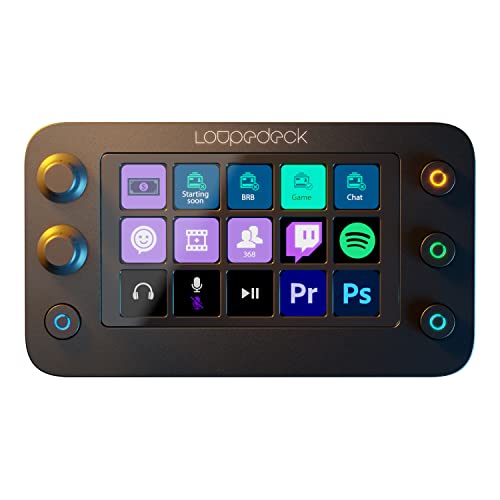
The Live S is the only deck here that is not made by Elgato, and it is the best pick for creators who split their time between streaming and editing. Fifteen touchscreen buttons with haptic feedback sit alongside two analog dials and four tactile RGB buttons. The touchscreen buttons can show labels, icons, and small status readouts, while the dials handle volume, brush size, timeline scrubbing, and other continuous values.
Loupedeck software is the reason to choose this deck over an Elgato. Its integrations for Photoshop, Premiere Pro, Final Cut Pro, and Lightroom are deeper than the equivalents on the Stream Deck app. The trade-off is the touchscreen itself: touch buttons have no travel and no click, so fast, blind presses during a live show are less certain than on a physical key. Confirm the listing names model LDD-2201; the older Loupedeck Live, model LDD-2001, is a different console.
Specs:
– Keys: 15 customizable touchscreen buttons with haptic feedback
– Key type: Touchscreen buttons plus 4 tactile RGB buttons
– Dials: 2 analog dials
– Touch strip: None
– Connectivity: USB-C
– Software: Loupedeck software for Windows and macOS
– Model: LDD-2201
– ASIN: B0BMLQYZNF
Who Should Skip a Stream Deck
A stream deck is the wrong purchase for several common setups. If you stream from a console with no computer in the chain, a deck has nothing to connect to, since every deck here needs a Windows or macOS machine running companion software. If your show is a single scene with a mute button, a keyboard shortcut does the same job for free.
Budget is another honest filter. A deck is a convenience device, not a requirement for a good stream. A creator who still needs a better microphone, camera, or lighting should spend on those first. Finally, skip the largest decks if the desk is small: a thirty-two-key surface that does not fit beside the keyboard ends up out of reach.
FAQ
Do stream decks work without a computer?
No. Every deck in this roundup needs a Windows or macOS computer running its companion app. The deck sends commands to the app, and the app controls OBS Studio, Twitch, Spotify, and the rest.
How many keys does a beginner streamer need?
Eight keys cover a beginner setup: scene switching, mic mute, a sound effect or two, and a chat command. Fifteen keys is the comfortable middle ground once scenes, cameras, and lighting presets grow. Thirty-two keys only makes sense above twenty always-visible actions.
Can one stream deck control both streaming and editing apps?
Yes. The Stream Deck app and Loupedeck software both support profiles that switch automatically when the active app changes. A deck can control OBS Studio during a stream and switch to Premiere Pro shortcuts the moment the editor opens.
What is the difference between the classic MK.2 and the scissor-key MK.2?
Both are fifteen-key decks with the same layout, the same software, and the same plugin library. The difference is the key hardware: the classic version uses membrane keys, while the newer version uses scissor switches with a shorter, firmer press. They are separate listings.
Final Verdict
The Elgato Stream Deck MK.2 is the best stream deck for most creators. Fifteen LCD keys, the largest plugin library in the category, and a compact footprint cover the needs of a solo streamer, a podcaster, and a small production team alike.
The other four picks serve narrower needs well. The Stream Deck XL suits multi-camera productions where every action must stay visible. The Stream Deck Plus suits creators who adjust audio and lighting live. The Neo suits a small desk or a portable rig, and the Loupedeck Live S suits creators who edit as much as they stream. Pick the deck that matches the workflow, and confirm the model number before ordering.
More from Amazon
Programs that pair well with the guide above. Offers and eligibility are set by Amazon and may change.
Free shipping on eligible items, Prime Video and more. Eligible new members can start with a free trial.
Start a Prime free trialAudiobooks and podcasts to listen to on the go. Eligible new members can start with a free trial.
Try Audible freeAd-free music streaming. Eligible new subscribers can start with a free trial.
Try Music Unlimited freeA free business account with business pricing and bulk-buying tools for work, shop or home office.
Create a business accountAs an Amazon Associate we earn from qualifying purchases.



Write Your Review
No reviews yet. Be the first to share your experience!