

Key takeaways
- Compare five audio interfaces for home recording, from simple two-input units to models with MIDI and loopback, and find the right fit for your studio.
- Top Pick: Focusrite Scarlett 2i2 3rd Gen
- Runner-up: PreSonus AudioBox USB 96 25th Anniversary Edition
- Also consider: MOTU M2
A home recording setup lives or dies by the box between your microphone and your computer. The right audio interface turns a quiet bedroom into a workable studio, capturing clean vocals, guitar, and keys without hiss, hum, or delay. The wrong one adds noise, limits your inputs, or fights your software every session.
This guide compares five audio interfaces that suit home recording, from a compact two-input unit for solo vocalists to flexible models with MIDI connections and loopback for streamers and podcasters.
As an Amazon Associate, we earn from qualifying purchases.
Quick answer
For most home studios, the Focusrite Scarlett 2i2 3rd Gen is the simplest choice, with two clean inputs and an Air mode for brighter vocals. The MOTU M2 adds a level display and sharper conversion, while the PreSonus AudioBox USB 96 25th Anniversary covers MIDI keyboards. Choose the Audient iD4 MKII for a single premium preamp, and the PreSonus AudioBox GO for the most portable setup.
Focusrite Scarlett 2i2 3rd Gen
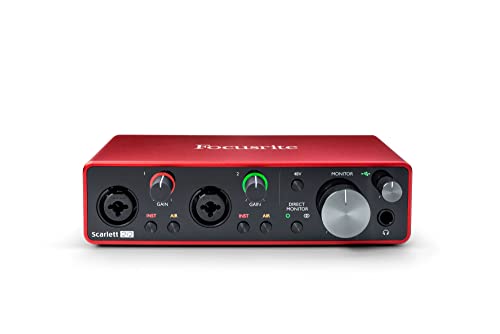
The Scarlett 2i2 3rd Gen has become the default first interface for home studios, and the reasons are practical rather than flashy. Two combination inputs accept a microphone or an instrument, so a singer with a guitar can record both at once without swapping cables. The preamps run clean at normal gain, and the Air mode adds a gentle lift to vocals and acoustic guitar when a track sounds dull. Phantom power covers condenser microphones, and a direct monitor switch lets you hear yourself without the delay that makes vocal takes feel strange.
Setup is straightforward. The unit connects over USB-C, draws power from the computer, and works with the major recording programs on Windows and Mac. Two gain halos around the knobs change color as the signal rises, which makes it easy to set levels without staring at a meter on screen. The headphone output is strong enough for most studio headphones.
The main limitation is the input count. Two inputs cover a solo performer or a simple duo, but a drummer or a band session needs a larger interface. The 3rd Gen model is also an earlier generation, so buyers should confirm the listing matches the model they want before ordering.
Specs: 2-in/2-out USB-C interface; 24-bit/192 kHz conversion; 2 mic/line/instrument inputs; Air mode; 48V phantom power; direct monitor; model AMS-SCARLETT-2I2-3G; ASIN B07QR73T66.
PreSonus AudioBox USB 96 25th Anniversary Edition
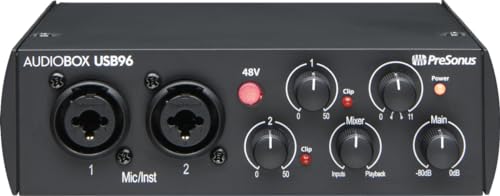
The AudioBox USB 96 25th Anniversary Edition is the pick for home studios that include a MIDI keyboard or an older hardware synth. Its MIDI in and out ports connect controllers and sound modules that USB-only interfaces leave behind, and the bundled recording software gives a new studio a complete first setup. Two combination inputs handle a microphone and an instrument, and the preamps stay quiet through the gain range most home vocalists use.
The anniversary edition marks 25 years of the AudioBox line with the same rugged metal case the series is known for. That weight matters on a desk that gets bumped, moved, and rearranged between sessions. A mixer knob blends the input signal with playback from the computer, which helps when tracking vocals over a backing track. The headphone output and main outputs are simple and clearly labeled, so there is little to learn before the first take.
Conversion tops out at 24-bit/96 kHz, which is more than enough for finished songs, podcasts, and video voice work. The trade-off against newer rivals is the absence of a level display and the older USB connection, but neither affects the recorded sound. For a studio built around a MIDI keyboard and a microphone, this is the most complete package of the five.
Specs: 2-in/2-out USB interface; 24-bit/96 kHz conversion; 2 mic/instrument inputs; MIDI in/out; 48V phantom power; mixer knob for input/playback blend; includes Studio One Artist; model AUDIOBOX 96K 25TH; ASIN B08D8R6VFC.
MOTU M2
The MOTU M2 is the interface for recordists who want to see their levels without opening a meter window. A small LCD on the front panel shows input and output levels for both channels, which makes gain staging fast and reduces clipped takes. Under the hood, an ESS Sabre32 Ultra converter delivers clean, detailed sound that holds up well against interfaces costing considerably more.
The two inputs accept microphones, instruments, and line sources, and the preamps offer generous clean gain for dynamic microphones that need a push. MIDI in and out cover keyboards and controllers, and a loopback feature routes computer audio into a recording program, which streamers and podcasters use to capture calls and playback together. The metal case feels solid, the knobs turn smoothly, and the unit runs on USB-C bus power.
Output quality is a quiet strength. The headphone amplifier drives demanding headphones without strain, and the balanced line outputs feed studio monitors with low noise. If your sessions involve a microphone, a keyboard, and occasional streaming, the M2 covers all three without a second box.
Specs: 2-in/2-out USB-C interface; 24-bit/192 kHz conversion; ESS Sabre32 Ultra DAC; LCD level meters; 2 mic/line/instrument inputs; MIDI in/out; loopback for streaming; 48V phantom power; ASIN B0812B26TN.
PreSonus AudioBox GO

The AudioBox GO is the smallest interface in this guide, and its appeal is portability. It fits in a jacket pocket or a laptop bag, draws power from a single USB-C cable, and gives a traveling musician or podcaster a real XLR input anywhere a laptop goes. One combination input takes a microphone or an instrument, and a second instrument input sits beside it for a guitar or bass.
Despite its size, the GO does not feel like a toy. The metal shell survives bag travel, the gain knob is easy to reach, and the headphone output is clear enough for tracking and editing on the move. The 24-bit/96 kHz conversion matches the larger AudioBox USB 96, so the sound quality does not drop with the size.
The compromise is obvious: one microphone input means solo recording only, and there is no MIDI connection. A vocalist who records alone, a guitarist who sketches ideas in hotel rooms, or a podcaster who records remote interviews will find it enough. Anyone who records two microphones at once should look at the two-input picks above.
Specs: 2-in/2-out USB-C interface; 24-bit/96 kHz conversion; 1 XLR mic/instrument input plus 1 instrument input; bus powered; headphone output; includes Studio One Prime; ASIN B09N557CYK.
Audient iD4 MKII
The Audient iD4 MKII takes a different approach from the other picks: one excellent microphone preamp instead of two good ones. Its Class-A preamp comes from the same design family as Audient console preamps, and it gives vocals and acoustic instruments a clear, open character that cheaper preamps struggle to match. The JFET instrument input is tuned for guitar and bass, so direct-recorded instruments keep their attack and body.
The rest of the unit matches that quality. Conversion runs at 24-bit/96 kHz, the headphone output is strong, and a ScrollControl feature turns the large volume knob into a scroll wheel for your recording software. Loopback support covers streaming and podcast recording, and the all-metal case sits flat on a desk without sliding. USB-C bus power keeps the cable count at one.
The single microphone input is the real limitation. Duets, two-microphone guitar techniques, and interview podcasts need a second preamp, and the iD4 MKII cannot provide one. For a solo vocalist, a songwriter, or a guitarist who records one source at a time and wants the best sound per input, it is the strongest pick in this guide.
Specs: 2-in/2-out USB-C interface; 24-bit/96 kHz conversion; 1 Class-A mic preamp; JFET instrument input; ScrollControl knob; loopback; 48V phantom power; ASIN B08SBSN88X.
How to choose an audio interface for home recording
Count your inputs first. A solo vocalist needs one microphone input, a singer-songwriter needs two, and a keyboard player needs MIDI. Buying more inputs than you use wastes money, but buying fewer forces awkward workarounds in every session. Match the input count to the largest session you plan to record at the same time.
Look at the preamp quality next, especially if you use a dynamic microphone. Dynamic microphones need more clean gain than condensers, and a weak preamp adds hiss when the gain climbs. Interfaces with a reputation for quiet, high-gain preamps suit dynamic microphones, while any of the picks above handles a condenser with ease.
Check the connection and the software. USB-C bus-powered units keep a small desk tidy, and a bundled recording program saves a separate purchase for new users. Loopback matters if you stream or record remote calls, because it captures computer audio alongside your microphone.
Finally, think about the room. An interface cannot fix a noisy room or a boomy corner, so pair the purchase with basic treatment such as a rug, curtains, or a reflection filter if the recordings sound echoey. A modest interface in a treated corner often sounds better than a premium one in a bare room.
Who should skip these audio interfaces
Skip this guide if you record a full drum kit or a live band, because two inputs cannot capture that many sources at once. Look for an interface with four or eight inputs instead, and plan for the extra microphones and cables that a larger session requires.
Skip it as well if you only need to plug headphones into a laptop for listening, since an interface adds cost and cables without improving playback enough to matter. A simple headphone amplifier or a better pair of headphones is the cheaper fix.
Drummers who record with a single overhead microphone can still use a two-input interface, but anyone planning to mic each drum separately should move up a size class. The same applies to podcasters who record three or four hosts around one table.
Frequently asked questions
Do I need phantom power for my microphone?
Phantom power matters only for condenser microphones, which need it to operate. Dynamic microphones do not need it, and ribbon microphones can be damaged by it, so check your microphone type before switching it on. All five interfaces here provide phantom power with a clear switch.
How many inputs do I need for a home studio?
One input covers a solo vocalist or instrumentalist, two cover a singer with a guitar or a simple interview, and MIDI covers a keyboard controller.
What is loopback, and do I need it?
Loopback routes audio playing on your computer into your recording software alongside your microphone. It matters for streamers, podcasters who record remote guests, and anyone capturing gameplay or video calls. If you only record your own voice or instrument, you can ignore it.
Will a better interface fix a noisy recording?
A better interface reduces electronic hiss, but it cannot remove room echo, fan noise, or street sound picked up by the microphone. Fix the room first with soft furnishings and a quieter recording time, then upgrade the interface if hiss remains at normal gain.
Final verdict
The Focusrite Scarlett 2i2 3rd Gen is the best first choice for most home studios because it covers the common case, two inputs, clean preamps, and simple setup, without extras that confuse a new user. The MOTU M2 is the upgrade for recordists who want a level display and sharper conversion, while the PreSonus AudioBox USB 96 25th Anniversary Edition is the right call for MIDI keyboard owners.
Choose the Audient iD4 MKII when a single superb preamp matters more than a second input, and take the PreSonus AudioBox GO when the studio travels with you. Confirm the exact model and inputs before ordering, and re-check availability at publish time.
More from Amazon
Programs that pair well with the guide above. Offers and eligibility are set by Amazon and may change.
Free shipping on eligible items, Prime Video and more. Eligible new members can start with a free trial.
Start a Prime free trialAudiobooks and podcasts to listen to on the go. Eligible new members can start with a free trial.
Try Audible freeAd-free music streaming. Eligible new subscribers can start with a free trial.
Try Music Unlimited freeA free business account with business pricing and bulk-buying tools for work, shop or home office.
Create a business accountAs an Amazon Associate we earn from qualifying purchases.



Write Your Review
No reviews yet. Be the first to share your experience!