

Key takeaways
- Five simple USB microphones for seniors: big mute buttons, plug-and-play setup, and clear voices for family calls, recording, and online classes.
A laptop microphone is fine until the first long family call, when everyone on the other end starts asking you to repeat yourself. A dedicated USB microphone fixes that in one step: plug it in, choose it as the input, and your voice comes through clearly, without the echo a built-in microphone picks up.
The best microphone for seniors is the simplest one that still sounds good. Every pick below connects by USB with no driver to install, sits on its own desk stand, and has a mute control you can find by touch. No audio interface, no extra software, and nothing to assemble before the first call.
As an Amazon Associate, we earn from qualifying purchases.
Table of Contents
- Short Answer
- How to Choose a Microphone for Seniors
- Blue Yeti USB Microphone
- RØDE NT-USB Microphone
- Audio-Technica AT2020USB+ Microphone
- HyperX SoloCast USB Microphone
- Samson Meteor Mic
- Frequently Asked Questions
- Conclusion
Short Answer
The Blue Yeti is the best microphone for seniors overall: a big mute button, a gain knob, a headphone volume control, and a sturdy desk stand in one plug-and-play package. For the clearest voice, the RØDE NT-USB adds a pop filter. For the simplest setup, the HyperX SoloCast mutes with one tap.
How to Choose a Microphone for Seniors
Start with the connection. A USB microphone plugs into a laptop or desktop and appears in the sound settings within seconds, with no driver to install.
Next, check the mute control. A large physical mute button, or a tap-to-mute surface, silences the microphone mid-call without hunting through software menus. Also check the stand: a microphone that ships with its own desk stand is ready the moment it arrives.
Finally, consider room noise and the headphone jack. Condenser microphones capture a full voice but also pick up fans and typing, so sit about a hand’s width away with the microphone pointed at your mouth. A headphone output on the microphone lets you hear your own voice in real time.
Blue Yeti USB Microphone
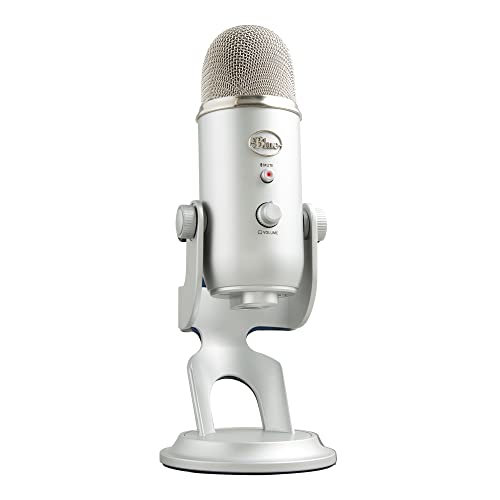
The Blue Yeti is the best microphone for seniors overall and the most forgiving pick in this guide. It is a USB condenser microphone built around a three-capsule array that plugs in and works immediately, with the desktop stand included, so it is ready for the first call within minutes.
The controls are the reason the Yeti leads this guide. The mute button is large and clearly marked on the front, easy to find by touch, with a gain knob and a headphone volume knob beside it. A headphone jack lets you hear your own voice while you speak. Four pickup patterns are selected with a dial on the back: cardioid for one voice at a desk, bidirectional for a face-to-face conversation, omnidirectional for a group around a table, and stereo for music. For family calls, leave it on cardioid.
Two details need confirming before ordering. First, match the Silver listing exactly, model 988-000103: the Midnight Blue and Blackout colorways are separate listings, and one crawl of each showed no featured offers available. Second, the full Blue VO!CE effects need a Logitech G HUB download, but the microphone works for calls without it.
| Spec | Detail |
|---|---|
| Model | Yeti, 988-000103 |
| Type | USB condenser, three-capsule array |
| Connection | USB Type-A |
| Pickup patterns | Cardioid, bidirectional, omnidirectional, stereo |
| Mute control | Large front mute button |
| Gain control | Knob on the microphone |
| Headphone output | Yes, with volume knob |
| Stand | Desktop stand included |
| Weight | 3.2 lb with stand |
| Dimensions | 4.9 x 4.7 x 11.6 in |
| ASIN | B002VA464S |
RØDE NT-USB Microphone

The RØDE NT-USB is the premium pick in this guide and the clearest-sounding microphone here for a single voice at a desk. It is a USB condenser microphone with a cardioid pattern, which hears the voice in front of it and rejects most sound from the sides and behind. A pop filter and a tripod desk mount are included, so there is nothing extra to buy.
Setup is as simple as the Yeti: plug the USB cable into the computer, choose the microphone in the sound settings, and start talking. The headphone output has its own volume and mix controls, which let you balance your own voice against the sound from the computer. The tripod holds the microphone at mouth height when seated and folds flat for storage, and the pop filter softens the sharp pops on words that start with P and B.
One point to check before ordering: match the standard NT-USB listing exactly. The NT-USB Mini is a smaller, different microphone, and the NT-USB+ is a newer model with its own listing. The NT-USB is the most expensive microphone here and the most sensitive to room noise, so in a room with a loud fan or television, the Yeti or the SoloCast will be more forgiving, but in a quiet room, nothing here sounds clearer.
| Spec | Detail |
|---|---|
| Model | NT-USB |
| Type | USB condenser |
| Connection | USB |
| Pickup pattern | Cardioid |
| Mute control | None on the microphone; mute in the call app |
| Headphone output | Yes, with volume and mix controls |
| Included | Pop filter, tripod desk mount |
| Weight | About 1.15 lb |
| ASIN | B00KQPGRRE |
Audio-Technica AT2020USB+ Microphone

The Audio-Technica AT2020USB+ is the simplest premium microphone in this guide, and the best choice for someone who wants excellent voice quality with the fewest controls to learn. It is a cardioid condenser microphone that connects by USB, with a built-in headphone jack and volume control, and a tripod desk stand included.
There is almost nothing to set up. Plug it in, choose it in the sound settings, and speak. The only controls are the headphone volume and a mix control, both on the front, so there is no pattern dial to set and no gain knob to adjust by accident. The headphone jack lets you hear your own voice with no delay.
One detail to confirm before ordering: match the standalone AT2020USB+ listing exactly, model AT2020USB+. The AT2020USB+PK pack adds a boom arm and headphones under a different listing. The AT2020USB+ has no mute button on the microphone, so muting happens in the call app. If a physical mute button matters to you, the Yeti or the SoloCast is the better choice.
| Spec | Detail |
|---|---|
| Model | AT2020USB+ |
| Type | USB condenser |
| Connection | USB |
| Pickup pattern | Cardioid |
| Frequency response | 20 Hz to 20 kHz |
| Mute control | None on the microphone; mute in the call app |
| Headphone output | Yes, with volume and mix controls |
| Stand | Tripod desk stand included |
| ASIN | B00B5ZX9FM |
HyperX SoloCast USB Microphone

The HyperX SoloCast is the easiest microphone to mute in this guide, and the best choice for someone who wants one control and nothing else to learn. It is a compact USB condenser microphone with a cardioid pattern, and its entire top surface is a tap-to-mute sensor: tap once to mute, tap again to unmute, with a light that shows whether it is live.
That single control is the reason the SoloCast earns a place here. On a family call, a cough or a knock at the door is one tap away from silence, and the light on top tells you at a glance whether you can be heard. Setup is plug and play: the USB-C cable connects to the computer, the microphone appears in the sound settings, and the tiltable stand holds it at a comfortable angle. A built-in shock mount reduces the thump that travels up through the desk when the table is bumped.
Two details need confirming before ordering. First, match the original SoloCast in Black exactly: the White colorway is a separate listing, and the SoloCast 2 is a newer model with its own listing. Second, the SoloCast has no gain knob and no headphone jack, so volume is set in the computer’s sound settings. If headphone monitoring matters to you, look at the Yeti or the AT2020USB+ instead.
| Spec | Detail |
|---|---|
| Model | SoloCast, HMIS1X-XX-BK/G |
| Type | USB condenser |
| Connection | USB-C |
| Pickup pattern | Cardioid |
| Mute control | Tap-to-mute sensor on top, with LED indicator |
| Headphone output | None |
| Stand | Tiltable stand included, built-in shock mount |
| ASIN | B08KFL3SFV |
Samson Meteor Mic

The Samson Meteor Mic is the most portable microphone in this guide and the best choice for a senior who moves between rooms, or between home and a family member’s house. It is a USB condenser microphone with a cardioid pattern, and its legs fold back flat against the body, so it packs into a bag and sets up on any table in seconds.
The folding legs are the whole design. Open them and they form a stable tripod stand on a desk; fold them back and the microphone is ready to travel, with a carrying case included. There is no separate stand to lose and no arm to clamp to a table. Controls are simple: a headphone jack with a volume control on the front, and a mute switch. The microphone connects by USB with no driver to install.
One point to check before ordering: match the standard Meteor Mic listing exactly. The .ca listing under a different ASIN is a different marketplace, so order from the .com listing. The Meteor Mic has no gain knob, so the recording level is set in the computer’s sound settings. It sits closer to the desk than the Yeti or the NT-USB, so raise it on a small stack of books if your voice sounds thin.
| Spec | Detail |
|---|---|
| Model | Meteor Mic, SAMTR |
| Type | USB condenser |
| Connection | USB |
| Pickup pattern | Cardioid |
| Mute control | Mute switch on the microphone |
| Headphone output | Yes, with volume control |
| Stand | Folding legs form a tripod stand |
| Included | Carrying case, mini-USB cable |
| ASIN | B004MF39YS |
Frequently Asked Questions
Do I need to install software for a USB microphone?
No. Every microphone in this guide is plug and play: connect the USB cable, open the sound settings, and choose the microphone as the input. Optional apps add extra effects, but the microphone works for calls without them.
How far should I sit from the microphone?
About a hand’s width away, with the microphone pointed at your mouth. Too far away raises room noise relative to your voice, and too close makes loud words distort.
Which microphone is best for family video calls?
The Blue Yeti is the best all-round choice: its big mute button and gain knob are easy to find by touch, and its desk stand is sturdy. If you only want one control, the HyperX SoloCast mutes with a single tap.
Can I use these microphones with a tablet or a phone?
Usually not directly. These microphones are designed for a laptop or desktop computer with a USB port. Some tablets accept one with an adapter, but the connection is not guaranteed.
Conclusion
The best microphone for seniors is the one that disappears into the call. For most people, that is the Blue Yeti: a big mute button, a gain knob, a headphone volume control, and a sturdy desk stand, all working the moment it is plugged in. The RØDE NT-USB sounds the clearest in a quiet room. The Audio-Technica AT2020USB+ is the simplest premium choice. The HyperX SoloCast mutes with one tap. The Samson Meteor Mic folds flat for travel. Choose the one whose controls feel easiest, and test it on a short call first.
Product and ASIN Reference
| Product | ASIN |
|---|---|
| Blue Yeti USB Microphone, Silver | B002VA464S |
| RØDE NT-USB Microphone | B00KQPGRRE |
| Audio-Technica AT2020USB+ Microphone | B00B5ZX9FM |
| HyperX SoloCast USB Microphone, Black | B08KFL3SFV |
| Samson Meteor Mic | B004MF39YS |
More from Amazon
Programs that pair well with the guide above. Offers and eligibility are set by Amazon and may change.
Free shipping on eligible items, Prime Video and more. Eligible new members can start with a free trial.
Start a Prime free trialAudiobooks and podcasts to listen to on the go. Eligible new members can start with a free trial.
Try Audible freeAd-free music streaming. Eligible new subscribers can start with a free trial.
Try Music Unlimited freeA free business account with business pricing and bulk-buying tools for work, shop or home office.
Create a business accountAs an Amazon Associate we earn from qualifying purchases.








Write Your Review
No reviews yet. Be the first to share your experience!